English Swahili Dictionary11.5.1
Publisher Description


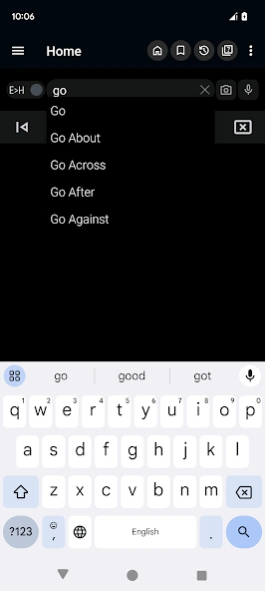

Offline, reliable, fast English-Swahili and Swahili-English dictionary for all
English - Swahili Dictionary
Experience a comprehensive, offline, and free Swahili to English and English to Swahili dictionary. This versatile tool is designed to make word searches seamless and efficient, whether you’re online or offline. Designed for convenience and learning, this app is perfect for students, professionals, and anyone looking to bridge the gap between Swahili and English languages.
Key Features:
• Offline Access: Search Swahili and English words anytime, even without an internet connection.
• Two-Way Search: Seamlessly switch between Swahili to English and English to Swahili dictionary.
• OCR (Optical Character Recognition): Easily extract and search text directly from images. Just capture or upload a photo, and the app will identify and translate the words for you. Perfect for reading signs, books, or handwritten notes!
• Integrated with Other Apps: Use the dictionary directly from your browser or other applications via the sharing option. Select "Swahili Dictionary" from the sharing menu, and it will open with the shared word—no need to type! After use, you’ll return to your previous app.
• Custom Themes: Choose from different themes to personalize the app’s appearance. Whether you prefer a light, dark, or colorful design, the app adapts to your style.
Learning and Productivity Features:
• Study Tool: Add words to a personalized study plan and review them anytime to strengthen your vocabulary.
• Word Games: Engage with fun vocabulary-building games like quizzes and challenges.
• MCQ (Multiple Choice Questions): Test your knowledge with interactive quizzes and track your progress.
• History & Backup: Access your search history and back up your data to ensure you never lose your learning progress.
• Speech to Text: Use voice search to find words quickly without typing.
• Synonyms and Antonyms: Enrich your understanding of words with related and opposite terms.
Ease of Use and Accessibility:
• Auto-Suggestion: Get real-time word suggestions as you type. For users with low-performance devices, the option to disable this feature ensures a smoother experience.
• Quick Access: A convenient dictionary icon in the notification bar allows you to launch the app instantly.
• Search from Images: Extract text from images using OCR, making the app especially helpful for students and professionals.
• Customizable Themes: Switch between themes to enhance readability and match your preferences.
Additional Features:
• No Internet Required: Fully functional offline for uninterrupted learning and searching.
• Sharing and Copying: Share words and meanings with friends or copy them for use in other applications.
• Pronunciation Assistance: Hear word pronunciations for better language learning.
Perfect for All Devices:
Discover the Best Way to Learn.
This app combines the practicality of a dictionary with the fun of learning tools, games. With its OCR feature, customizable themes, and extensive word database, this dictionary is more than just a tool—it’s your partner in mastering Swahili and English.
Download now and take your language skills to the next level!
About English Swahili Dictionary
The company that develops English Swahili Dictionary is INNOVATIVE SOFT. The latest version released by its developer is 11.5.1.
To install English Swahili Dictionary on your Android device, just click the green Continue To App button above to start the installation process. The app is listed on our website since 2026-09-17 and was downloaded 14 times. We have already checked if the download link is safe, however for your own protection we recommend that you scan the downloaded app with your antivirus. Your antivirus may detect the English Swahili Dictionary as malware as malware if the download link to com.hdictionary.sw is broken.
How to install English Swahili Dictionary on your Android device:
- Click on the Continue To App button on our website. This will redirect you to Google Play.
- Once the English Swahili Dictionary is shown in the Google Play listing of your Android device, you can start its download and installation. Tap on the Install button located below the search bar and to the right of the app icon.
- A pop-up window with the permissions required by English Swahili Dictionary will be shown. Click on Accept to continue the process.
- English Swahili Dictionary will be downloaded onto your device, displaying a progress. Once the download completes, the installation will start and you'll get a notification after the installation is finished.
Program Details
System requirements
Download information
Pricing
Version History
version 11.5.1
posted on 2026-09-17
• The classic theme is now available for use.
• A compact design option has been introduced.
• The "Copy to Search" functionality has been enhanced for better usability.
• Improvements have been made to the Optical Character Recognition (OCR) feature for greater accuracy.
version 10.5.5
posted on 2024-12-11
version 10.5.3
posted on 2024-10-23
• The old theme can now be used.
• Compact design has been added.
• Copy to Search has been improved.
• The Optical Character Recognition (OCR) feature has been improved.
version 9.0.3
posted on 2022-04-11
. Backup bug fixed.
. Copy to Search is improved.
. The notification is improved.
. The Optical Character Recognition (OCR) feature is improved.
version nao
posted on 2020-11-01
. New launch icon and design.
. Copy to Search is improved.
. The notification is improved.
. The Optical Character Recognition (OCR) feature is improved.
version nao
posted on 2019-11-02
. Crash fixed
. Next button is added
. The Optical Character Recognition (OCR) feature is improved
. Copy scanner improved for popup
. Keep screen on option added
. Online backup added
. Improved design
version Nao
posted on 2019-02-11
. Notification bar bug is fixed for Oreo
. Next button is added
. The Optical Character Recognition (OCR) feature is improved
. Copy scanner improved for popup
. Keep screen on option added
. Online backup added
. Improved design
version neutron
posted on 2017-10-22
• Copy scanner improved for popup
• Keep screen on option added
• Online backup added
• Improved design
version eclair
posted on 2016-07-25
Bug fixed!
